

TL;DR:
- A recordkeeping workflow is a structured process that ensures proper creation, review, approval, storage, and disposal of business records. Small businesses must design their process first before choosing automation tools to prevent disorganization and compliance risks.
A recordkeeping workflow is a structured process that governs how business records are created, organised, approved, stored, and securely archived or disposed of. For entrepreneurs and small business owners, a well-designed workflow is not a luxury. It is the foundation of accurate financial management and defensible compliance. Without it, records scatter across inboxes, version conflicts multiply, and audit trails collapse precisely when you need them most.
What are the key stages of a recordkeeping workflow?

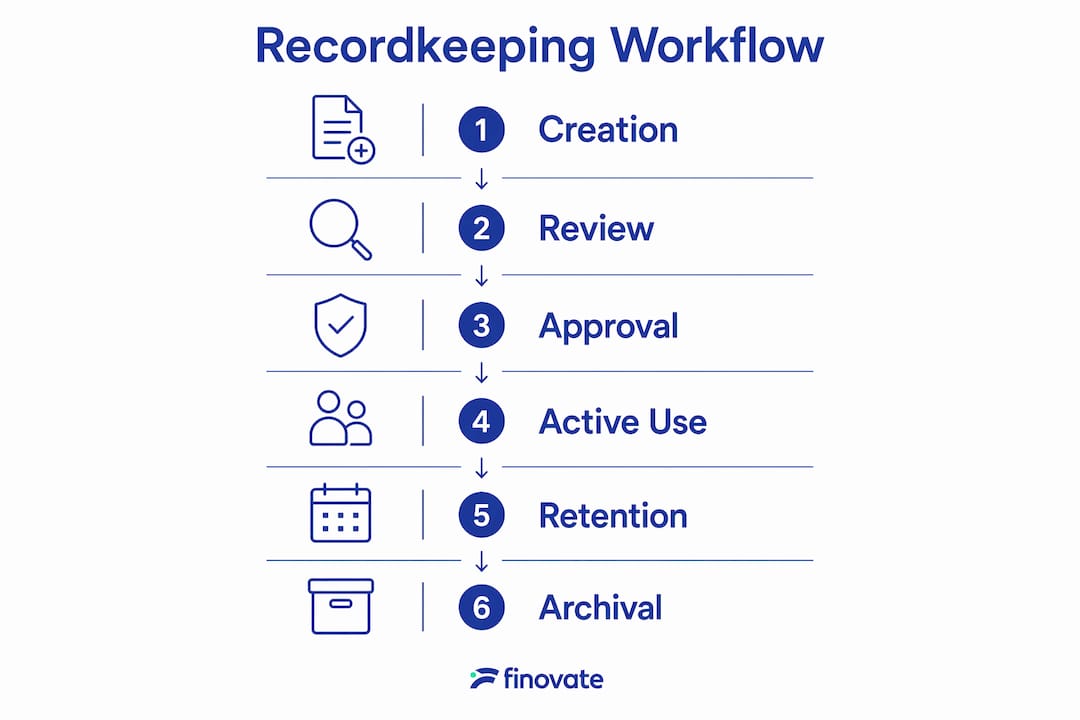
A standard document lifecycle covers six defined stages: creation or capture, review and collaboration, formal approval, active use, retention for compliance, and archival or secure disposal. Each stage has a distinct purpose, and skipping any one of them creates gaps that surface during audits or tax reviews.
The roles within a workflow matter as much as the stages themselves. Effective document workflows define distinct roles such as creator, reviewer, and approver, then automate routing between them while logging all changes with timestamps. This separation of duties prevents one person from both creating and approving a record, which is a common compliance risk for small teams.
Three technical features underpin every reliable workflow:
- Automated routing: Documents move to the next role automatically when a stage is complete, removing the need for manual handoffs.
- Change history and audit trails: Every edit, comment, and decision is logged with the user's name and a timestamp, creating a legally defensible record.
- Role-based permissions: Only authorised users can view, edit, or approve documents at each stage, protecting sensitive financial data.
- Version control: A single master version is maintained inside the workflow, not scattered across email attachments or shared drives.
The table below shows how each stage maps to a practical business action.
| Lifecycle stage | Business action |
|---|---|
| Creation | Capture the record immediately with date, participants, and purpose |
| Review | Assigned reviewer checks accuracy and completeness |
| Approval | Approver selects approve, reject, or request changes |
| Active use | Record is accessible to authorised users for reference |
| Retention | Record is held for the legally required period |
| Archival or disposal | Record is securely archived or destroyed per policy |
This structure applies directly to tax records for Finnish small businesses, where the Finnish Tax Administration requires businesses to retain accounting records for a defined number of years.
How can you implement a streamlined recordkeeping workflow?
The most common mistake is buying software before designing the process. Mapping your document flow before deploying any platform prevents digital chaos and significantly improves adoption. Start with what you already have, then build from there.
- Map your current document ecosystem. List every document type your business produces: invoices, contracts, payroll records, VAT filings, and meeting notes. Identify where each one currently lives and who touches it.
- Assign clear ownership. Every document type needs a named owner responsible for its accuracy and timely filing. Shared ownership without a named lead produces accountability gaps.
- Define approval paths with limited actions. Approvers should have only three options: approve, reject, or send back for changes. Unlimited approver freedom obscures audit history and weakens compliance validity.
- Set escalation rules. If an approval stalls beyond a set period, such as 48 hours, the workflow should automatically notify a backup approver. This prevents bottlenecks from blocking payroll runs or VAT submissions.
- Adopt a centralised document repository. Moving away from inbox-based filing to a single master file location eliminates version conflicts and lost records. Choose one location and enforce it consistently.
- Apply consistent naming conventions. A file named "Invoice_ClientA_2026-06-15" is findable in seconds. A file named "final_FINAL_v3_use this one" is not. Agree on a naming format and document it.
Pro Tip: Before selecting any workflow automation tool, spend one week manually tracing three of your most common document types from creation to filing. The gaps you find will define exactly which features you actually need.
Small business owners in Finland can also refer to Finovate's guidance on organising business finances step by step to align their document management process with local financial requirements.
Which common mistakes undermine your record management practices?
The most damaging mistake is digitising a broken process. Most workflow failures stem from moving chaotic manual processes into software without redesigning them first. The result is the same disorder, now with a subscription fee attached.
Relying on software alone, without well-defined processes and trained people behind it, produces digital filing cabinets that are just as disorganised as the paper ones they replaced. Technology amplifies the process you give it, good or bad.
Other pitfalls to avoid:
- Using email inboxes as filing systems. Inboxes are communication tools, not archives. Records stored in email threads are unsearchable, unversioned, and lost when staff leave.
- Ignoring retention policies. Every record type has a legally required retention period. Failing to archive or dispose of records on schedule creates both compliance risk and unnecessary storage costs.
- Allowing unlimited approver actions. When approvers can edit, forward, or comment without restriction, the audit trail becomes unreadable. Limit approver actions to three clear choices.
- Skipping training. Annual training is recommended by national archives authorities to maintain compliance and accountability. Staff who do not understand the workflow will work around it.
- Neglecting periodic review. A workflow designed in 2024 may not reflect your business in 2026. Schedule a quarterly review to catch outdated approval paths or missing document types.
For regulated contexts such as legal practices, trust account record management offers a useful model for retention policies and secure archival that translates well to any compliance-focused business.
What tools and features improve workflow efficiency and compliance?
The right tools do not replace a well-designed process. They enforce it consistently. When evaluating workflow automation tools, focus on these five feature categories rather than brand names or price alone.
| Feature category | What to look for | Why it matters |
|---|---|---|
| Conditional routing | Rules-based document paths | Sends records to the right person automatically |
| Audit trail logging | Timestamped user actions | Creates legally defensible compliance records |
| Escalation and reminders | SLA-based notifications | Prevents stalled approvals from blocking operations |
| Accounting integration | Direct data handoff to financial systems | Eliminates double keying and reduces errors |
| Retention policy automation | Scheduled archival and disposal triggers | Keeps records compliant without manual tracking |
Balanced notification design prevents email fatigue while keeping approvals moving. The standard approach is to send a reminder at the 24-hour mark and escalate to a backup approver after 48 hours. Sending notifications too frequently causes people to ignore them entirely.
Cloud and mobile access matters more than most small business owners expect. When you are meeting a client or travelling between sites, the ability to approve a document or retrieve a VAT record from your phone removes a genuine bottleneck. Look for tools that offer full functionality on mobile, not just read-only access.
Pro Tip: Integrate your workflow tool with your accounting system before you integrate it with anything else. Approved invoices and expense records flowing automatically into your accounts eliminate the single largest source of data entry errors in small business finance.
Finovate's guide on the financial reporting process workflow covers how these integrations work in practice for Finnish entrepreneurs.
Key takeaways
A well-structured recordkeeping workflow, built on clear roles, defined approval paths, and centralised storage, is the most direct way to improve both financial accuracy and compliance for small businesses.
| Point | Details |
|---|---|
| Start with process mapping | Map your document flow before selecting any software or automation tool. |
| Define roles and approval limits | Assign named owners and restrict approvers to three actions: approve, reject, or return. |
| Centralise document storage | Use one master repository with consistent naming conventions to prevent version conflicts. |
| Automate escalation rules | Set 48-hour escalation triggers to stop stalled approvals from blocking critical tasks. |
| Train and review regularly | Annual training and quarterly workflow reviews keep your record management practices current and compliant. |
Why process always comes before technology
Working with small business owners over the years, I have seen the same pattern repeat itself. A business owner invests in a document management platform, spends weeks configuring it, and then finds that adoption is poor and records are still scattered. The technology was not the problem. The process was never defined in the first place.
The businesses I have seen get this right share one habit: they map before they build. They spend time understanding who creates each document, who needs to review it, and what happens when an approver is unavailable. That clarity makes every subsequent decision, including which tool to use, far simpler.
I also think the compliance angle is underestimated by most entrepreneurs. Audit trails are not just for large corporations. A Finnish tax authority query or a contract dispute can arrive without warning, and the quality of your records at that moment determines the outcome. Explicit, limited approver actions and timestamped change histories are not bureaucratic overhead. They are your protection.
My honest advice: do not wait until you have a compliance problem to build a proper workflow. Start with your three most important document types, define the stages and roles for each, and build from there. Incremental improvement beats a perfect system that never gets implemented.
— Busayo
How Finovate supports your recordkeeping and financial management
Maintaining a reliable document management process takes consistent effort, and for many small business owners, it competes directly with the work of running the business itself.
Finovate provides accounting and bookkeeping services for entrepreneurs and small businesses in Finland, covering bookkeeping, VAT filing, payroll processing, and tax planning. We help you build the financial record practices that keep your business compliant and your accounts accurate, without requiring you to become an expert in document lifecycle management. If you are a light entrepreneur or sole trader, our accounting packages for entrepreneurs are designed to fit your specific obligations and workload.
FAQ
What is a recordkeeping workflow?
A recordkeeping workflow is a structured process that governs how business records are created, reviewed, approved, stored, and disposed of. It defines roles, approval paths, and retention rules to keep records accurate and compliant.
How many stages does a standard document lifecycle have?
A standard document lifecycle covers six stages: creation, review, approval, active use, retention, and archival or disposal. Each stage has a defined purpose and a responsible role.
Why do small businesses need workflow automation tools?
Workflow automation tools enforce consistent approval paths, log changes with timestamps, and trigger escalations when approvals stall. They reduce manual errors and produce the audit trails required for tax and compliance purposes.
How long should small businesses retain financial records in Finland?
The Finnish Accounting Act requires businesses to retain accounting records, including invoices and ledgers, for a minimum of six years from the end of the financial year. Retention policy automation can trigger archival reminders automatically.
What is the biggest mistake in building a recordkeeping workflow?
The biggest mistake is deploying software before defining the underlying process. Digitising a flawed process produces the same disorder in digital form. Map your document flow and assign clear ownership before selecting any tool.