

TL;DR:
- A chart of accounts is an organized list of all business financial accounts, essential for accurate reporting and compliance. Proper structure ensures clear financial statements, simplifies VAT processes, and supports informed management decisions. Regular review and a streamlined approach prevent errors and help the business grow efficiently.
A chart of accounts (COA) is an indexed list of every financial account your business uses to record transactions, grouped under five core categories: assets, liabilities, equity, revenue, and expenses. For a UK small business, a properly structured COA means your profit and loss report reflects reality, your balance sheet reconciles cleanly, and your VAT submissions under HMRC's Making Tax Digital for VAT are far less painful to prepare.
This guide covers everything you need to get your COA right:
- The five main account types, with UK-relevant examples
- How numbering conventions work and a sample chart you can adapt
- A step-by-step setup checklist
- Best practices, common mistakes, and how cloud accounting software fits in
Table of Contents
- Why does a chart of accounts matter for your business?
- What are the five core account types?
- How does a chart of accounts connect to your financial statements?
- How should you structure and number your accounts?
- How do you set up a chart of accounts for your business?
- What are the best practices for keeping your COA useful?
- What mistakes do small businesses commonly make with their COA?
- How does cloud accounting software help you manage your COA?
- How can your COA become a decision-making tool?
- Key takeaways
- A practitioner's view on COA problems in small businesses
- Useful sources and further reading
Why does a chart of accounts matter for your business?
A COA is not just an administrative formality. It is the structure that determines whether your financial reports tell you something useful or simply confirm that money moved.
When your accounts are grouped logically, your profit and loss statement can show you gross profit by service line, not just a single revenue total. Your balance sheet separates current assets from fixed assets without manual sorting at year-end. And when it comes to VAT, a digital-first COA that integrates with cloud accounting materially reduces the manual work of preparing returns under Making Tax Digital for VAT.
The practical benefits for a small UK business are direct:
- Accurate financial statements. Transactions post to the right account consistently, so your reports reflect actual performance rather than a mix of correctly and incorrectly coded entries.
- Better management decisions. Segmenting revenue by product or service line lets you see which parts of the business are profitable and which are not, without waiting for a year-end review.
- Smoother VAT and MTD compliance. When accounts map cleanly to VAT categories, your software can pull the right figures automatically rather than requiring manual adjustment each quarter.
- Faster bookkeeping. Clear account names and codes reduce the time a bookkeeper spends deciding where a transaction belongs.
Pro Tip: Set up a separate nominal code for each distinct VAT rate you use (standard-rated, zero-rated, exempt). This single step can cut the time spent reconciling your VAT return by a significant margin each quarter.
What are the five core account types?
Every account in your COA belongs to one of five categories. Understanding what sits in each one is the foundation of accurate bookkeeping.
Assets
Assets are everything your business owns or is owed. They split into current assets (cash, trade debtors, prepayments, stock) and fixed assets (equipment, vehicles, leasehold improvements). For a UK small business, this category also includes VAT reclaimed but not yet received from HMRC.

Liabilities
Liabilities are what your business owes to others. Current liabilities include trade creditors, PAYE and National Insurance Contributions payable to HMRC, VAT collected on sales (output VAT), and Corporation Tax payable. Long-term liabilities cover bank loans and finance leases.
Equity
Equity represents the owner's interest in the business after liabilities are deducted from assets. For a limited company, this includes share capital and retained earnings. For a sole trader or partnership, it includes the capital account and drawings. Owner drawings — money taken out of the business by the owner — sit here as a contra equity account.
Revenue
Revenue accounts capture income from your core trading activities: product sales, service fees, rental income. Keeping separate revenue accounts for each income stream is one of the most practical decisions you can make at setup. It lets you see, at a glance, which service or product is driving growth.
Expenses
Expenses cover the costs of running the business: staff salaries, rent, utilities, software subscriptions, professional fees, and depreciation. Accruals (costs incurred but not yet invoiced) and prepayments (costs paid in advance) are adjusting entries that typically sit in current assets or current liabilities rather than directly in expenses, though they flow through the profit and loss at the appropriate period.
How does a chart of accounts connect to your financial statements?
The COA is the map; the general ledger is the central record that holds the actual transactions posted against those account codes. Think of the COA as the index at the front of a book and the general ledger as the full text.
Every time a transaction occurs, it is posted to one or more accounts in the general ledger using the codes defined in the COA. Those postings then feed directly into your financial statements:
- Balance sheet accounts (assets, liabilities, equity) carry balances forward from one period to the next.
- Profit and loss accounts (revenue and expenses) reset to zero at the start of each new financial year, with the net result transferred to retained earnings.
A short example illustrates the flow. Suppose you purchase a laptop for £1,200 plus VAT:
| Account code | Account name | Debit | Credit |
|---|---|---|---|
| — | Computer equipment (fixed asset) | £1,200 | |
| — | VAT control (current asset) | — | |
| 1200 | Bank current account | — |

The equipment appears on your balance sheet under fixed assets. The VAT sits in the VAT control account until your next return. The bank account reduces by the full amount paid. Each of these codes exists in your COA; the general ledger records the transaction against them.
Accounts are ordered in the COA to mirror their appearance in financial statements: balance sheet accounts first, then income statement accounts. This ordering is not arbitrary. It speeds up report generation and reduces mapping errors at year end.
How should you structure and number your accounts?
A consistent numbering convention makes your COA readable to any bookkeeper or accountant who works with your records, and it makes report generation faster in any accounting package.
The most widely used convention for UK small businesses assigns number ranges by account type:
| Account range | Category | Examples |
|---|---|---|
| 1000 to 1499 | Assets | 1000 Cash |
| 2000 to 2499 | Liabilities | 2000 Trade creditors, — VAT control, — PAYE/NIC payable |
| 3000 to 3499 | Equity | 3000 Share capital |
| 4000 to 4499 | Revenue | 4000 Product sales, 4100 Service fees |
| 5000 to 5499 | Expenses | 5000 Salaries, 5100 Rent |
A sample chart of accounts for a UK small business
| Code | Account name | Description |
|---|---|---|
| 1000 | Cash at bank | Current account balance |
| — | Trade debtors | Invoices issued, not yet paid |
| 1200 | Prepayments | Costs paid in advance (e.g. annual insurance) |
| — | Computer equipment | Fixed assets: laptops, servers |
| 2000 | Trade creditors | Supplier invoices not yet paid |
| — | VAT control | Net VAT position (output minus input) |
| — | PAYE/NIC payable | Amounts due to HMRC for payroll |
| — | Corporation Tax payable | CT liability for the current period |
| 3000 | Share capital | Issued share capital |
| — | Retained earnings | Cumulative profit retained in the business |
| 4000 | Product sales | Revenue from goods sold |
| 4100 | Service fees | Revenue from consulting or service work |
| 5000 | Salaries and wages | Gross payroll costs |
| 5100 | Rent and rates | Office or premises costs |
| 5200 | Software subscriptions | Cloud tools, accounting software |
| 5300 | Professional fees | Accountancy, legal, advisory |
A few practical points on structure:
- Subaccounts extend a parent code (e.g. 4100.1 for one service line, 4100.2 for another) without cluttering the top-level list.
- Project or departmental tags are preferable to creating a new nominal account for every short-term project. Add a tag or cost centre code to transactions rather than proliferating accounts.
- Avoid account bloat. A COA with hundreds of rarely used accounts slows down coding decisions and produces reports that are hard to read. Around 20 accounts is a common starting point for small businesses, with additions made only when a genuine reporting need arises.
How do you set up a chart of accounts for your business?
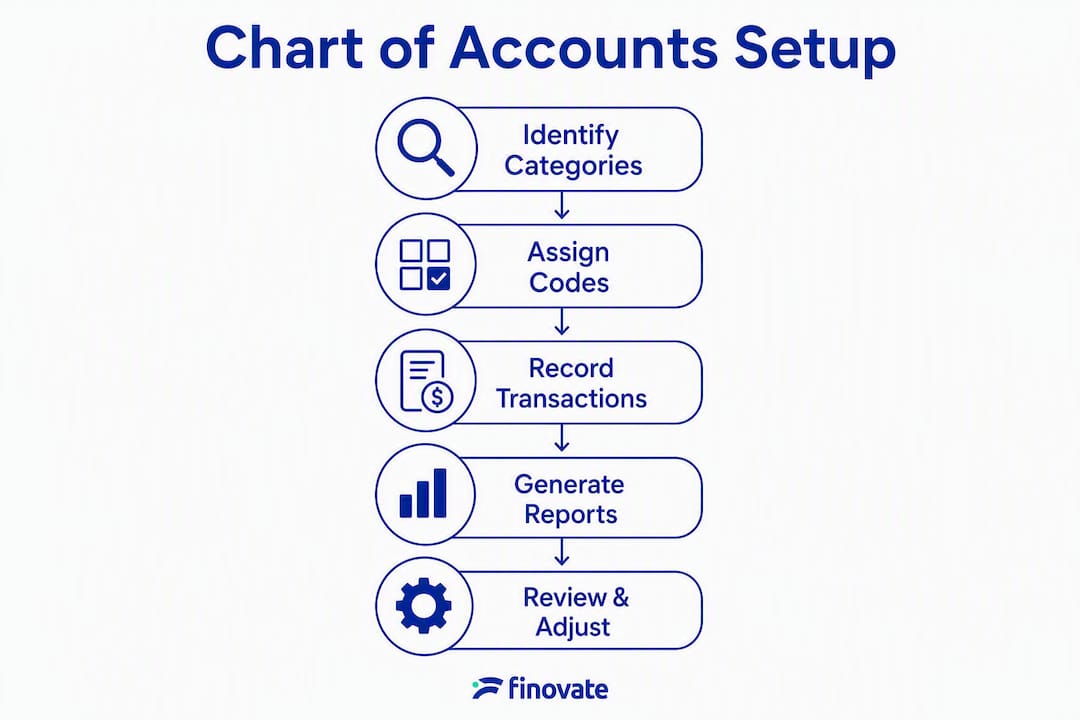
Whether you are starting from scratch or revising an existing structure, the process follows a logical sequence. Rushing this step creates problems that are costly to fix later.
Preparation
- List every account you currently use (or plan to use), including any your accounting software has created by default.
- Identify your main revenue streams. If you sell products and provide services, those are at minimum two separate revenue accounts.
- List your major expense categories. Group similar costs rather than creating an account for every supplier.
- Speak to your accountant before finalising the structure, particularly around year-end mapping, Corporation Tax provisions, and any industry-specific requirements.
Step-by-step setup checklist
- Choose your numbering convention. Use the 1000–5999 range above, or adapt it to your software's nominal code system.
- Create core accounts first. Start with the accounts you use every week: bank, trade debtors, trade creditors, VAT control, main revenue lines, salaries, and rent.
- Add subaccounts where reporting genuinely requires it. Do not create subaccounts speculatively.
- Write a brief description for each account. One sentence explaining what belongs there prevents miscoding by bookkeepers or future staff.
- Test with sample transactions. Post five to ten representative transactions and check that the resulting profit and loss and balance sheet look correct.
- Reconcile opening balances. If migrating from an existing system, map old account balances to new codes and confirm the balance sheet still balances.
Migration advice
Changing account structure mid-year can break historical comparisons and complicate year-end reporting. If you need to restructure, do it at the start of a new financial year or at least at a period boundary (e.g. the start of a new VAT quarter). Document the mapping between old and new codes, and reconcile the trial balance before and after the change.
Pro Tip: When migrating to new accounting software, resist importing your old COA without reviewing it first. Default charts supplied by software are often too broad. Reviewing and customising the default COA before you start posting transactions saves significant rework later.
What are the best practices for keeping your COA useful?
A COA that works well at setup can become a liability if it is not maintained. These rules keep it useful as your business grows.
- Keep it lean. Aim for the smallest number of accounts that gives you the reporting visibility you need. More accounts means more coding decisions, more opportunities for error, and harder-to-read reports.
- Use consistent naming. "Salaries and wages" should appear the same way every time. Inconsistent naming (sometimes "Staff costs", sometimes "Wages") creates confusion and makes searches unreliable in software.
- Write descriptions for every account. A one-sentence note on what belongs in each account is the single most effective way to reduce miscoding.
- Control who can add or rename accounts. In most small businesses, only the owner or the accountant should have permission to change the COA structure. Bookkeepers should code to existing accounts, not create new ones.
- Maintain a change log. Record the date, reason, and old-to-new mapping for any structural change. This is invaluable at year end and during any audit or review.
- Retire accounts cleanly. When an account is no longer needed, mark it inactive rather than deleting it. Deletion removes historical data from reports.
Pro Tip: Review any account labelled "Other" or "Miscellaneous" at the end of each month. If the same type of transaction keeps landing there, it belongs in its own account. If it is genuinely miscellaneous, the balance should be small and explainable.
What mistakes do small businesses commonly make with their COA?
Most COA problems fall into a handful of recurring patterns. Recognising them early saves time and avoids errors in your financial statements.
Common mistakes and how to correct them:
- Account bloat. Creating a new account for every supplier, project, or minor cost category produces a COA with dozens of rarely used accounts. Fix: consolidate similar accounts, use tags for project-level tracking, and set a rule that new accounts require accountant approval.
- Renaming accounts mid-year. Changing an account name without documenting the change breaks the ability to compare this year's figures with last year's. Fix: document all changes with a mapping note and make structural changes at period boundaries only.
- Misclassifying VAT. Posting output VAT (VAT collected on sales) to an expense account, or input VAT (VAT paid on purchases) to a revenue account, distorts both the profit and loss and the VAT return. Fix: use a dedicated VAT control account and reconcile it to your VAT return each quarter.
- Confusing capital and operating expenditure. A laptop purchase is a capital expense (fixed asset, depreciated over time), not an operating expense. Posting it to "office costs" overstates expenses and understates assets. Fix: apply a simple rule — anything with a useful life beyond one year and above a materiality threshold (many small businesses use £500) goes to a fixed asset account.
- Treating contra revenue as an expense. Discounts given to customers reduce revenue; they are not an expense. Fix: create a "Sales discounts" account within the revenue section (e.g. code 4900) and post discounts there.
A quick COA review checklist:
- Are all bank accounts reconciled and matching their statement balances?
- Does the VAT control account balance agree with your last VAT return?
- Are there any accounts with no transactions in the last 12 months? Consider retiring them.
- Are "Other" or "Miscellaneous" balances small and explainable?
- Do account names and codes match what your accountant expects at year end?
Reducing accounting errors through consistent coding practices is one of the highest-return habits a small business can build.
How does cloud accounting software help you manage your COA?
Modern cloud accounting packages store your COA centrally and apply it automatically to every transaction. When a rule is set up correctly, the software categorises recurring transactions without manual intervention, which reduces both effort and error.
Xero, for example, uses nominal codes that map directly to a COA structure. Automated bank rules can assign a transaction to the correct account based on the payee name or description, so routine costs like software subscriptions or utility bills post correctly without anyone reviewing them individually.
For UK businesses, the connection between a well-structured COA and Making Tax Digital for VAT is direct. When your accounts are mapped correctly to VAT categories, your software can generate a VAT return from the ledger data with minimal manual adjustment. A COA that has not been mapped to VAT categories forces manual reconciliation every quarter, which is where errors creep in.
Key points for software setup:
- Review the default COA before posting any transactions. Software defaults are designed for a broad range of businesses and often include accounts you will never use. Remove or deactivate irrelevant accounts at the start.
- Map each account to the correct VAT treatment. Standard-rated, zero-rated, exempt, and outside-the-scope transactions each need a distinct mapping.
- Use bank reconciliation rules. Set rules for recurring transactions so they post to the right account automatically.
- Check that your COA maps correctly to your management reports. Run a trial profit and loss and balance sheet after setup to confirm the structure produces the output you expect.
- Link your COA to your MTD-compatible software. HMRC's Making Tax Digital for VAT requires digital links between your records and your VAT submission. A correctly structured COA is the foundation that makes this work.
How can your COA become a decision-making tool?
Most small business owners think of the COA as a compliance requirement. The more useful framing is to treat it as a reporting instrument that you design deliberately to answer the questions you actually ask about your business.
A well-structured COA lets you see profitability by service line, not just total revenue minus total costs. If you run a consultancy that offers both project work and retainer contracts, separate revenue accounts for each tell you immediately which model generates more income and at what margin. The same logic applies to expenses: separating direct costs (costs that vary with output) from overhead costs (fixed regardless of activity) gives you a contribution margin figure without any manual calculation.
Practitioners often use project tags or cost centre codes rather than creating new nominal accounts for each short-term engagement. This keeps the COA lean while still enabling activity-based reporting. A courier business, for instance, might tag expenses by vehicle or route rather than creating a separate expense account for each one, keeping the top-level COA readable while preserving granular data for management review.
The practical recommendation: before finalising your COA, write down the three or four management questions you want your monthly accounts to answer. Then check that your account structure, as designed, would produce a report that answers each one. If it would not, adjust the structure before you start posting transactions.
Key takeaways
A chart of accounts is the structural foundation of your bookkeeping: get it right at the start and every report, VAT return, and year-end process becomes significantly easier.
| Point | Details |
|---|---|
| Definition | A COA is an indexed list of all financial accounts, grouped under assets, liabilities, equity, revenue, and expenses. |
| Five account types | Each transaction belongs to one of five categories; correct classification drives accurate financial statements. |
| Numbering convention | Use ranges (1000s–5000s) that mirror financial statement order to speed reporting and reduce mapping errors. |
| Setup discipline | List accounts, test with sample transactions, and reconcile balances before going live; make structural changes at period boundaries only. |
| MTD readiness | Map each account to the correct VAT treatment in your software so Making Tax Digital submissions require minimal manual adjustment. |
A practitioner's view on COA problems in small businesses
The most common COA issue we see in small business clients is not a missing account. It is an overcrowded one. A business that has been running for two or three years without a structured review often has thirty or forty accounts where fifteen would do, several with names that made sense to whoever created them but are opaque to anyone else, and at least one "Miscellaneous" account that has become a catch-all for anything the bookkeeper was uncertain about.
The second most common problem is timing. A business owner decides to restructure the COA in month seven of the financial year because the reports are not giving them what they need. The restructure is correct in principle, but it creates a break in the data that makes year-end comparison unreliable and gives the accountant extra work to reconcile.
Our honest advice: if your current COA is not working, document the problems now, plan the restructure, and implement it at the start of your next financial year. If you are setting up for the first time, keep it simple, write descriptions for every account, and review it with an accountant before you post your first transaction. Finovate's accounting and bookkeeping services are available to help you design or review a COA that fits your business model and reporting needs, without overcomplicating the structure.
Useful sources and further reading
The following sources are worth consulting directly for further detail on COA structure, UK tax obligations, and Making Tax Digital:
- HMRC: Making Tax Digital for VAT — the primary source for MTD obligations, digital record-keeping requirements, and compatible software lists.
- Chart of accounts — Xero UK glossary — a clear, practical definition with UK-oriented examples and guidance on using a COA within cloud accounting software.
- Chart of accounts — Investopedia — covers the COA-to-general-ledger relationship and account type definitions in accessible language.
- Chart of accounts — Wikipedia — useful background on numbering conventions, account ordering, and the historical development of COA standards.
- Chart of accounts — TechTarget — step-by-step setup guidance covering account listing, numbering, testing, and reconciliation.
- Finovate accounting services — professional support for COA setup, bookkeeping, VAT reporting, and year-end accounts for small businesses.
This article provides general information about chart of accounts structure and UK accounting practices. It is not a substitute for professional accountancy advice. Confirm your specific reporting and VAT obligations with a qualified accountant or directly with HMRC.